
How to Fill Out a 4473 Electronically (and What Changed in November)
How to Fill Out a 4473 Electronically (and What Changed in November)
Practical habits for working through a 4473 on a screen at the gun counter, plus the November 2026 MyFFLBook updates to names, counties, and saving your work.
Every firearm sale at the counter runs through ATF Form 4473. Moving that form from paper to a screen can save time and cut down on the small mistakes that turn into big headaches at inspection time. But an electronic 4473 only helps if the software keeps up with a real counter: interruptions, buyers who type their own information, and names and addresses that don’t always fit a neat pattern.
This guide covers practical habits for working through a 4473 electronically, and the updates we shipped to the MyFFLBook electronic 4473 in November 2026.
This is general information, not legal advice. Always check the current form instructions and guidance on atf.gov.
Why shops move the 4473 to software
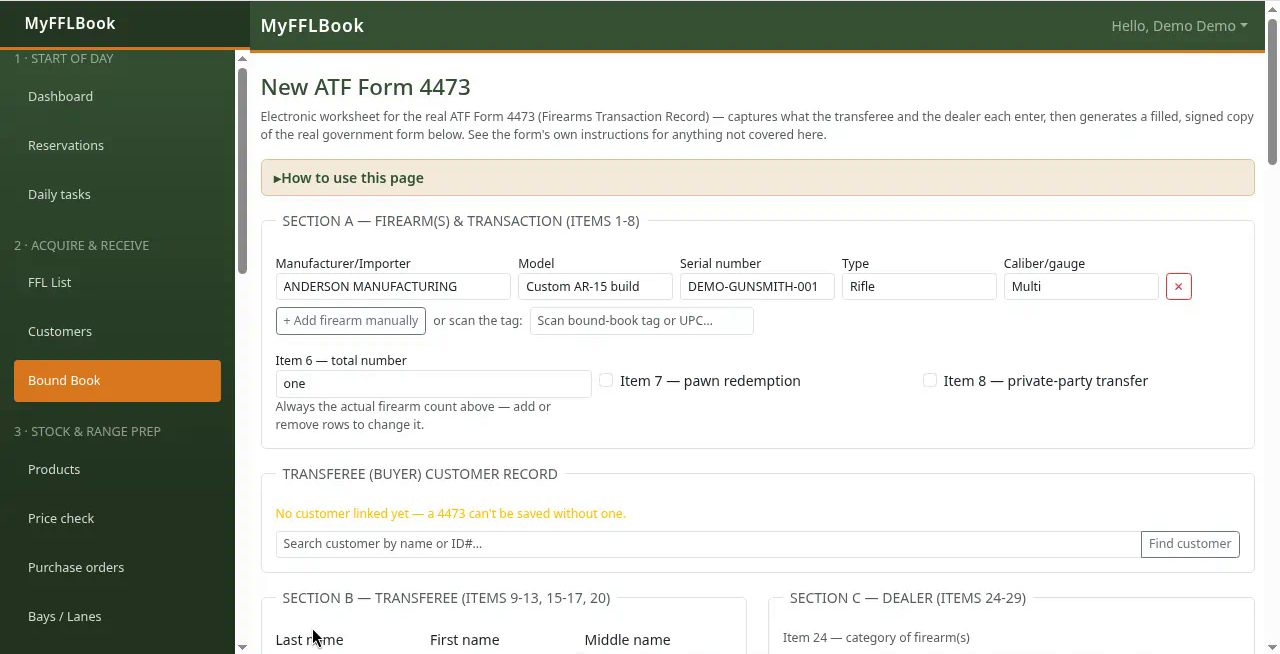
A paper 4473 lives on its own. An electronic 4473 can sit right next to the rest of your records. In MyFFLBook, the electronic 4473 is part of the electronic bound book (gun book), alongside acquisitions and dispositions, amendments, multi-photo records, and printable labels. You can see the full list on our Features List page.
Keeping the form in the same system as your bound book means fewer places to retype the same information. For shops that also use FastBound, MyFFLBook has a live FastBound integration for the 4473 process and electronic bound book (see Partners).
Practical habits for an electronic 4473
The exact steps depend on your shop and the current form, but a few habits help no matter how you work:
- Save early, and save again after each section. Counters get busy. A phone rings, another customer walks up, or the buyer steps away. Saving as you go protects what has already been entered.
- Let the buyer review their own section carefully. The buyer’s section is theirs to complete and certify. Give them time, and make sure what shows on screen matches what they meant to enter, especially their name.
- Be careful with certified information. Once a name or answer has been certified, any change should be deliberate and handled correctly. Know your shop’s process for corrections and amendments before you need it.
- Double-check places and spelling. County names, accents, and special characters are easy to get wrong. A mismatch on location details is the kind of thing that stands out later.
- Review the finished form before moving on. A final read-through takes a minute and can catch blanks or typos before the transaction is complete.
What’s new in the MyFFLBook electronic 4473 (November 2026)
We listened to how shops use the form at a real counter and shipped a set of fixes this month. From our What’s new page:
- The buyer’s name shows as a name. The buyer’s typed name now appears as the name itself, not a field label, so it is easier to confirm at a glance.
- Certified-name edits stay put. If you start changing a certified name, a background refresh will no longer wipe that edit.
- Less lost work. Unsaved forms are less likely to lose what you’ve entered — helpful on a busy day when the counter gets interrupted.
- County names display correctly. This includes a fix for missing Ohio counties and for characters used in Puerto Rico and New Mexico names.
- Clearer buyer section. The buyer section now makes it clearer that it appears after you save, so staff know what to expect next.
These are small changes, but they line up with the habits above: save your work, protect certified information, and get the details right.
More than a 4473
The electronic 4473 is one part of MyFFLBook. The same web app covers the electronic A&D bound book with a history of changes on each firearm entry, NFA Forms 1/2/4/5, POS with bill splitting, tills and end of shift, inventory and stock take, gunsmithing work orders, range bays and lanes, and electronic waivers. For inspection prep, MyFFLBook also includes ATF Forms 3310.11 and 3310.6 and a 4473 audit report for inspector lookback.
Want a head start on inspection readiness? Grab our free Bound Book & ATF Inspection Readiness Checklist — a one-page list to help get your bound book, 4473, and inventory records in order.
MyFFLBook is a SlingBuilt product from SFL Services LLC. To see updates across our whole product family, visit the SFL Services What’s new page.
Try it in your browser
MyFFLBook runs in the browser with no desktop install. Try the live demo and walk through the electronic 4473 yourself, or email us at sales@sflservicesllc.com with questions about getting your shop set up.